SolisAI Tariff Configuration Guide
Overview
Tariff configuration is one of the most important steps in the SolisAI setup process. Accurate tariff information allows the system to make intelligent decisions about when to:
- Charge the battery
- Discharge the battery
- Import power from the grid
- Export power to the grid
Without correct tariff information, Solis AI cannot fully optimize energy costs and revenue opportunities.
Supported Tariff Types
SolisAI supports three tariff sources.
Fixed Tariff
A fixed electricity price applies regardless of the time of day.
Use this setting when your utility charges a constant energy rate.
Dynamic Time-of-Use (TOU) Tariff
Electricity prices change based on market conditions.
Solis AI automatically responds to these price variations to optimize energy trading and battery utilization.
Static Time-of-Use (TOU) Tariff
Electricity prices change according to fixed schedules defined by the utility provider. Prices are known in advance and generally repeat daily or seasonally.
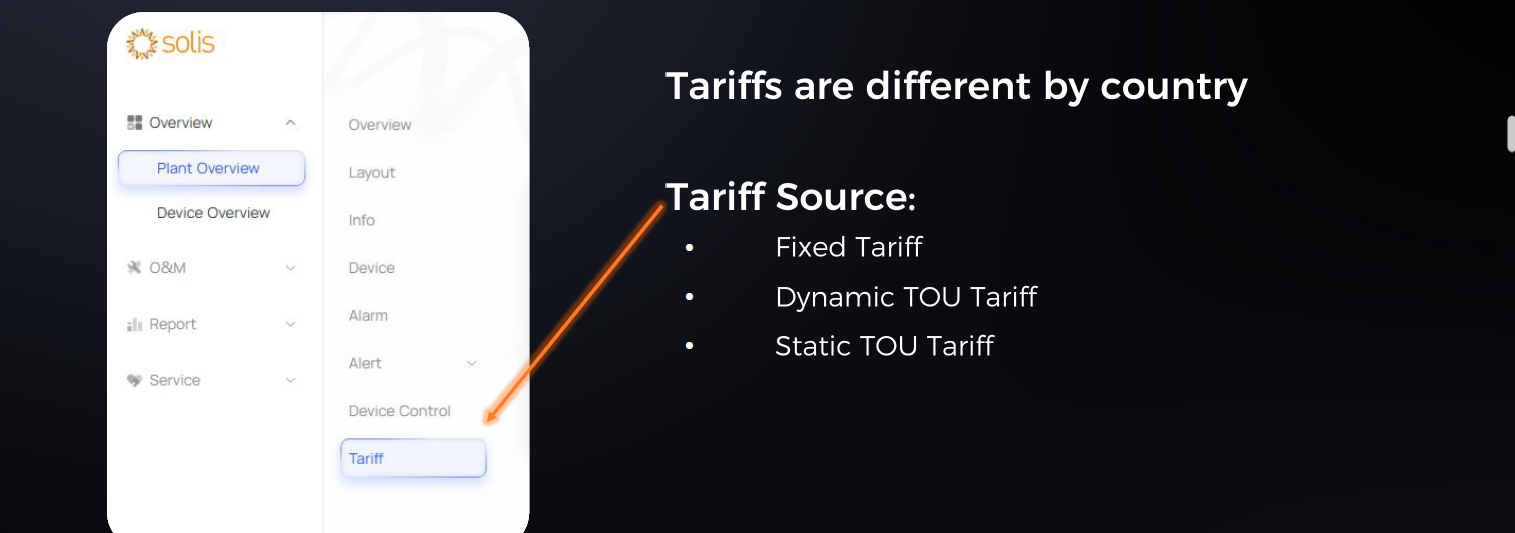
Selecting a Tariff Source
Within the Solis AI tariff settings menu, users can select:
- Fixed Tariff
- Market Dynamic TOU Tariff
- Static TOU Tariff
The selected tariff source will influence all future AI optimization decisions.
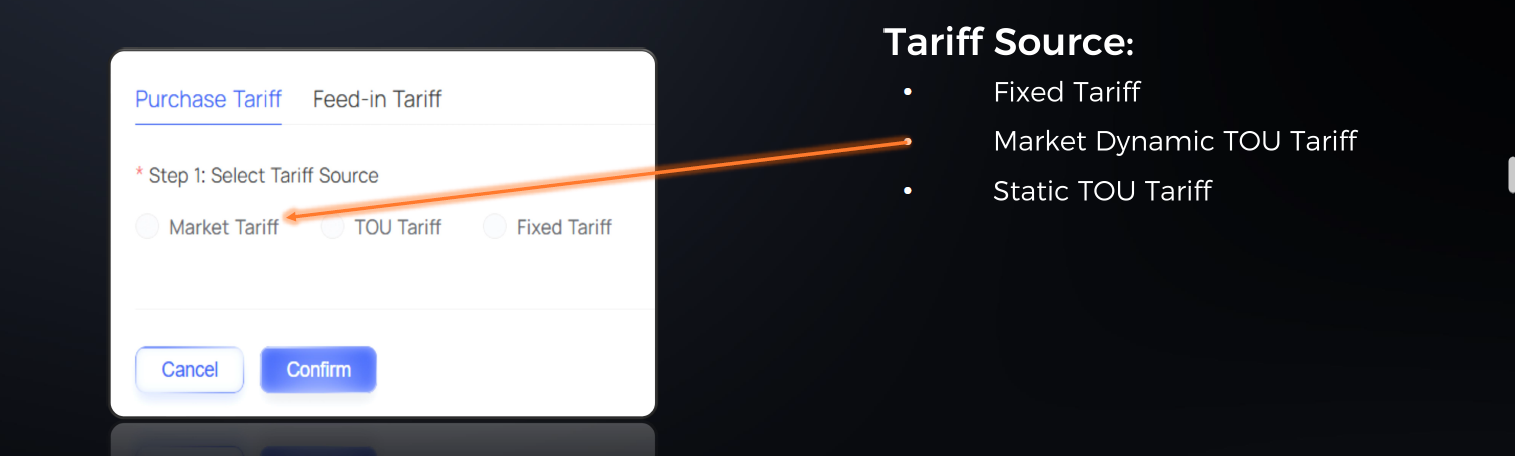
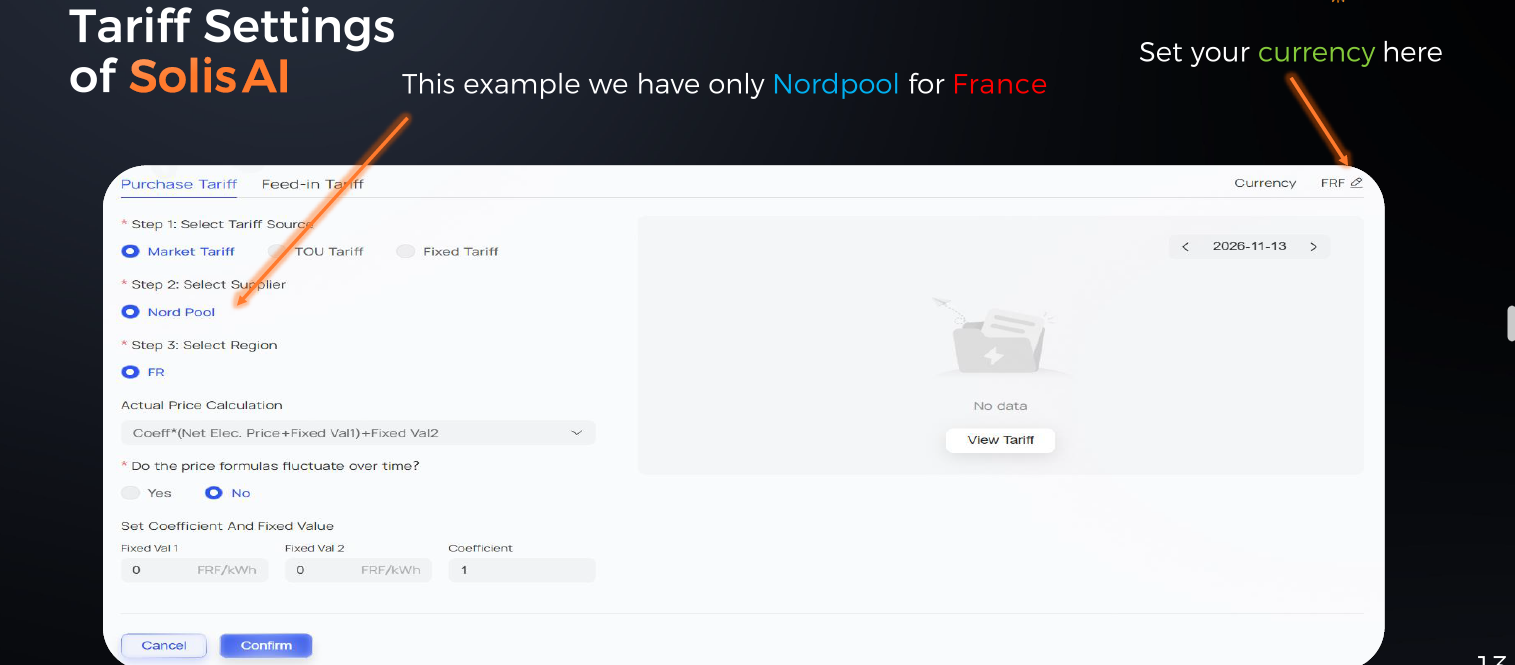
Configuring Dynamic Tariffs
In supported countries, SolisAI can retrieve electricity market pricing information automatically.
When configuring a dynamic tariff:
- Select the available market source.
- Confirm the correct country.
- Set the appropriate currency.
- Verify tariff data is updating correctly.
Italy Auto-Fetch Function
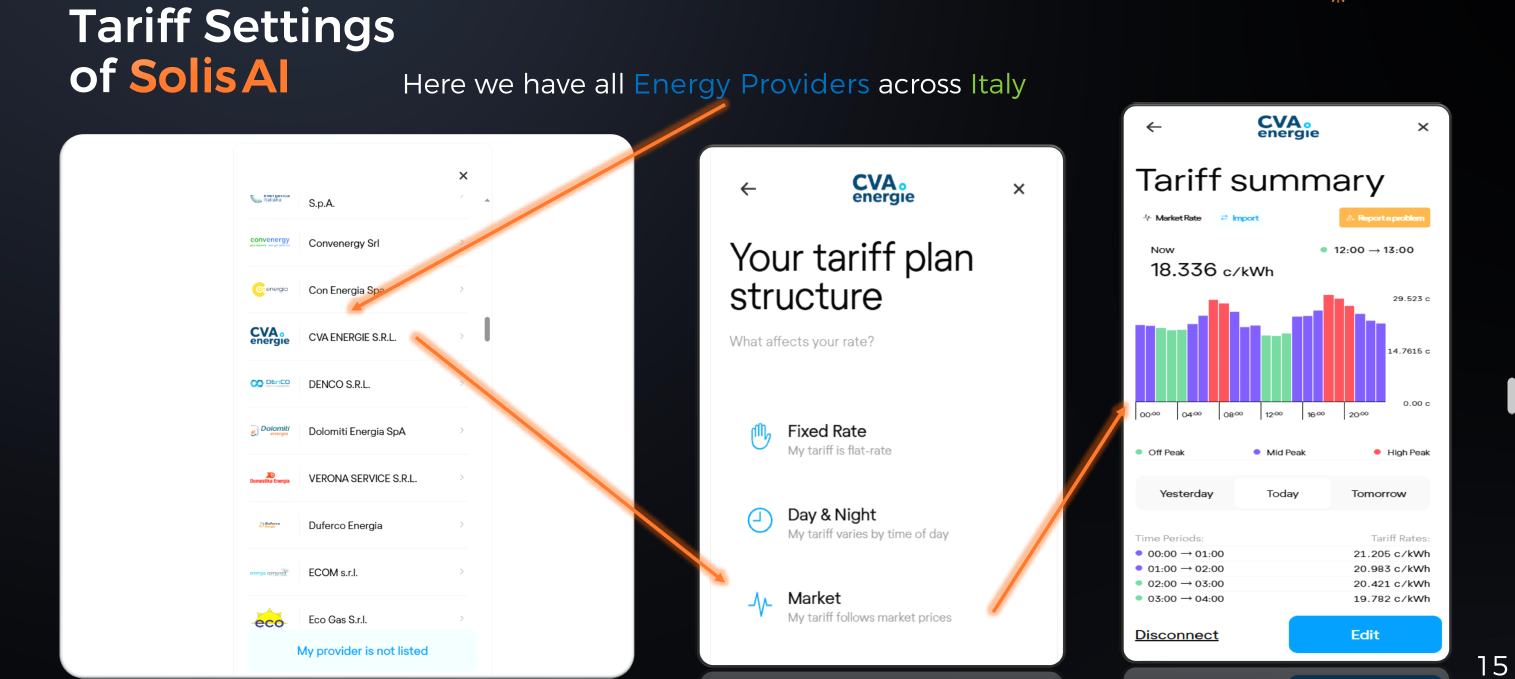
For Italy, SolisAI supports automatic tariff retrieval from supported providers.
Users can select their energy provider directly from a predefined list, allowing tariff information to be imported automatically. 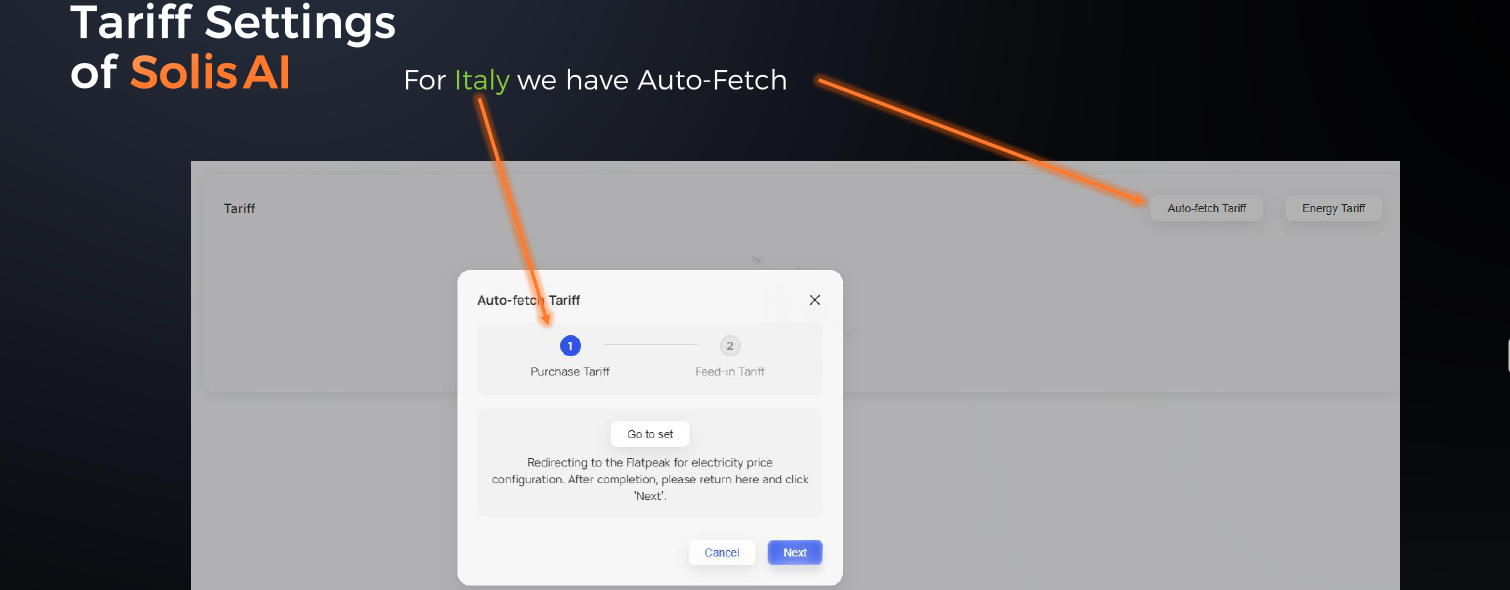
Configure Feed-In Tariffs
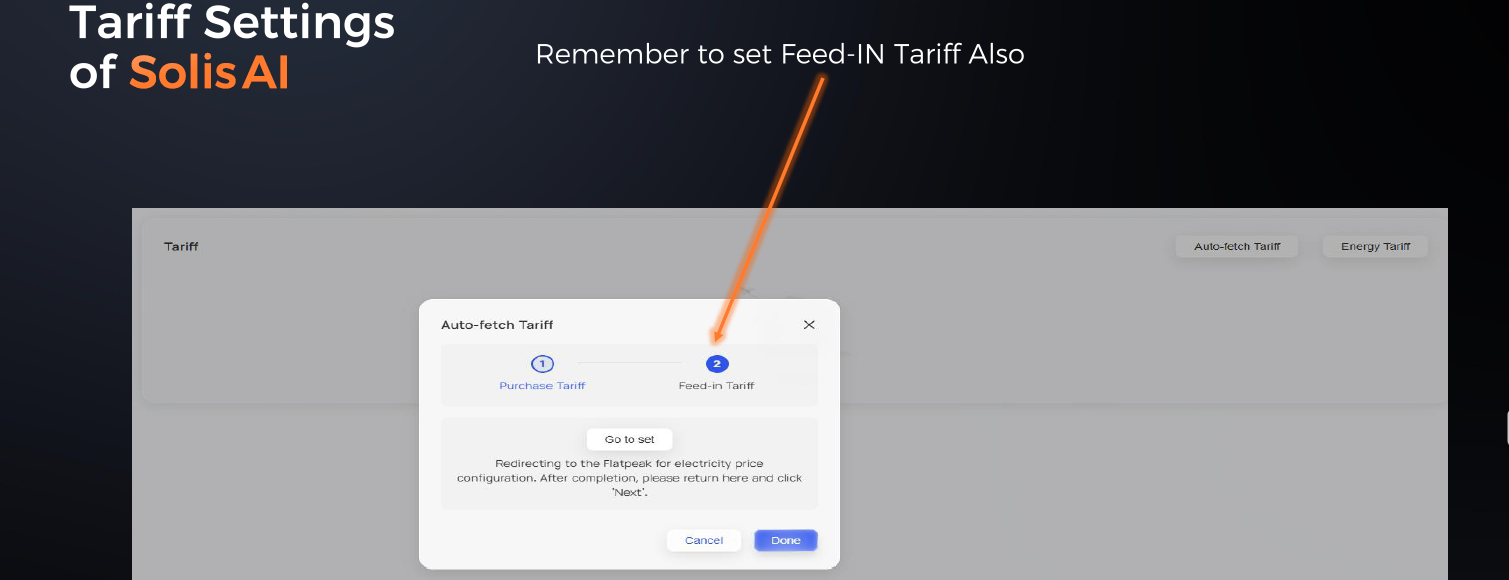
When configuring SolisAI, always ensure that both:
- Electricity purchase tariffs
- Feed-in tariffs
are configured correctly.
Feed-in tariff information allows the system to evaluate export opportunities and maximize revenue where supported.
Tariff Configuration Complete
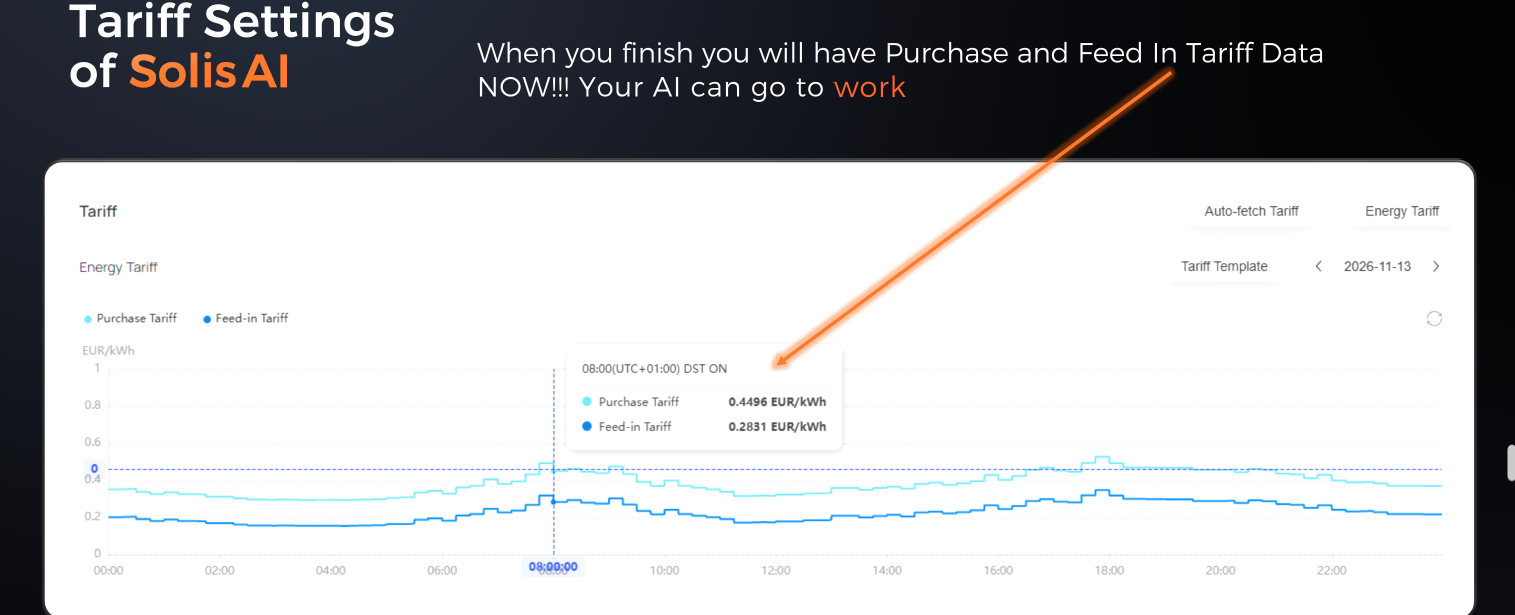
Once import and export tariff information has been configured, Solis AI can begin optimizing battery operation and energy trading automatically.
Country Tariff Availability
Tariff source availability varies by country and utility provider.
Supported tariff integrations may include:
- Nordpool
- ENTSO-E
- Flatpeak
- Country-specific providers
- Utility-specific integrations
Availability is subject to ongoing expansion and periodic updates. Users should verify currently supported tariff sources within SolisCloud.
| Country | Nordpool | ENTSO-E | Flatpeak |
Albania | ✅ | ❌ | |
| Austria | ✅ | To Be Activated | |
| Belgium | ✅ | ✅ | |
| Bulgaria | ✅ | ❌ | |
| Croatia | ✅ | ❌ | |
| Czech Republic | ✅ | ❌ | |
| Denmark | ✅ | To Be Activated | |
| Estonia | ✅ | To Be Activated | |
| Finland | ✅ | To Be Activated | |
| France | ✅ | To Be Activated | |
| Germany | ✅ | To Be Activated | |
| Greece | ✅ | ❌ | |
| Hungary | ✅ | ❌ | |
| Ireland | ✅ | To Be Activated | |
| Italy | ✅ | ✅ | |
| Latvia | ✅ | To Be Activated | |
| Lithuania | ✅ | To Be Activated | |
| The Netherlands | ✅ | ✅ | |
| Norway | ✅ | To Be Activated | |
| Poland | ✅ | ✅ | |
| Portugal | To Be Activated | ||
| Romania | ✅ | ❌ | |
| Slovak Republic | OKTE ✅ | OKTE ✅ | OKTE ✅ |
| Slovenia | ✅ | ❌ | |
| Spain | ✅ | ✅ | |
| Sweden | ✅ | To Be Activated | |
| Switserland | ✅ | ❌ | |
| United Kingdom | Octopus ✅ | To Be Activated |
Best Practices
To achieve the best performance:
- Use the correct tariff source.
- Configure both import and feed-in tariffs.
- Verify tariff data updates correctly.
- Review tariff settings after changing energy suppliers.
- Ensure battery reserve and operating mode settings align with the selected tariff strategy.
Additional Information
This article provides an overview of Solis AI tariff configuration.
For full country support information, detailed screenshots, provider-specific examples, and the latest tariff availability, refer to the attached pdf or contact our After Sales Team
Disclaimer
The information provided in this article is intended for guidance purposes only and should be used in conjunction with the latest Solis product documentation, installation manuals, and applicable local regulations.
Solis strongly recommends that all installation, maintenance, and electrical work is carried out by a qualified and licensed electrician or suitably trained professional in accordance with local laws, regulations, and safety requirements.
While every effort is made to ensure the accuracy of the information provided, content may be updated without notice as products, firmware, standards, and regulations evolve. The information contained within this article does not replace official product documentation or professional judgement.
Site-specific requirements, local regulations, utility requirements, and applicable standards may vary and always take precedence. If you are unsure whether a particular installation, configuration, or application is supported, please contact Solis Technical Support before proceeding.