AC-Coupling with the Solis S6-3P Hybrid Inverter
Scenarios, Setups, and Best Practices
Author: Solis Technical Team
Audience: Installers, EPCs, and O&M professionals retrofitting existing PV plants or expanding hybrid storage capabilities.
Download; PDF is attached at the bottom of the article
Overview
AC‑coupling allows you to integrate an existing grid‑tied PV inverter with a Solis S6 three‑phase hybrid inverter, enabling battery storage, backup power, and advanced export control—without rebuilding the DC side of an installed PV array. The S6 hybrid supports both Solis and third‑party three‑phase grid‑tied inverters, making it ideal for retrofit projects and phased upgrades.
Firmware note: Always upgrade the S6 hybrid inverter to the latest firmware before commissioning AC‑coupled modes to ensure feature compatibility and stability.
When AC‑Coupling Makes Sense
- Retrofitting existing PV plants: Keep the current grid‑tied inverter and add batteries for self‑consumption, TOU shifting, and backup.
- Phased deployments: Start with PV, add storage later without re‑wiring PV strings.
- Mixed fleets: The S6 hybrid supports Solis or third‑party three‑phase PV inverters within specified power limits.
Two Proven Topologies
For Series S6-EH3P(12-20)K-H and S6-EH3P(8-15)K02-NV-YD-L
1) Smart‑Port AC‑Coupling (Direct AC‑Gen Connection)
What it is: The third‑party or Solis grid‑tied inverter connects to the S6 hybrid’s AC‑Gen (Smart Port). The hybrid manages interaction with storage and loads.
Key requirements & behaviors
- Connect only three‑phase grid‑tied inverters; PV inverter AC power ≤ S6 hybrid rated AC power.
- On‑grid export control: Because the S6 cannot throttle a third‑party inverter directly, enable Max Export Control (Smart Port → AC Couple → Based on Export Power & SOC). If export exceeds the set limit for a defined period (e.g., >100 W for 30 s), the S6 opens the smart‑port relay to prevent over‑export.
- Off‑grid power sharing: The third‑party inverter must support over‑frequency load shedding (OFLS) and under‑frequency load rising (UFLR) in line with its correct grid code. The S6 will modulate frequency—e.g., when SOC ≥ 85%, the hybrid raises frequency to curtail PV, protecting the battery from overcharge.
Typical use cases
- Sites prioritizing tight export limits/zero‑export to grid.
- Smaller third‑party inverter capacity relative to the S6 hybrid rating.
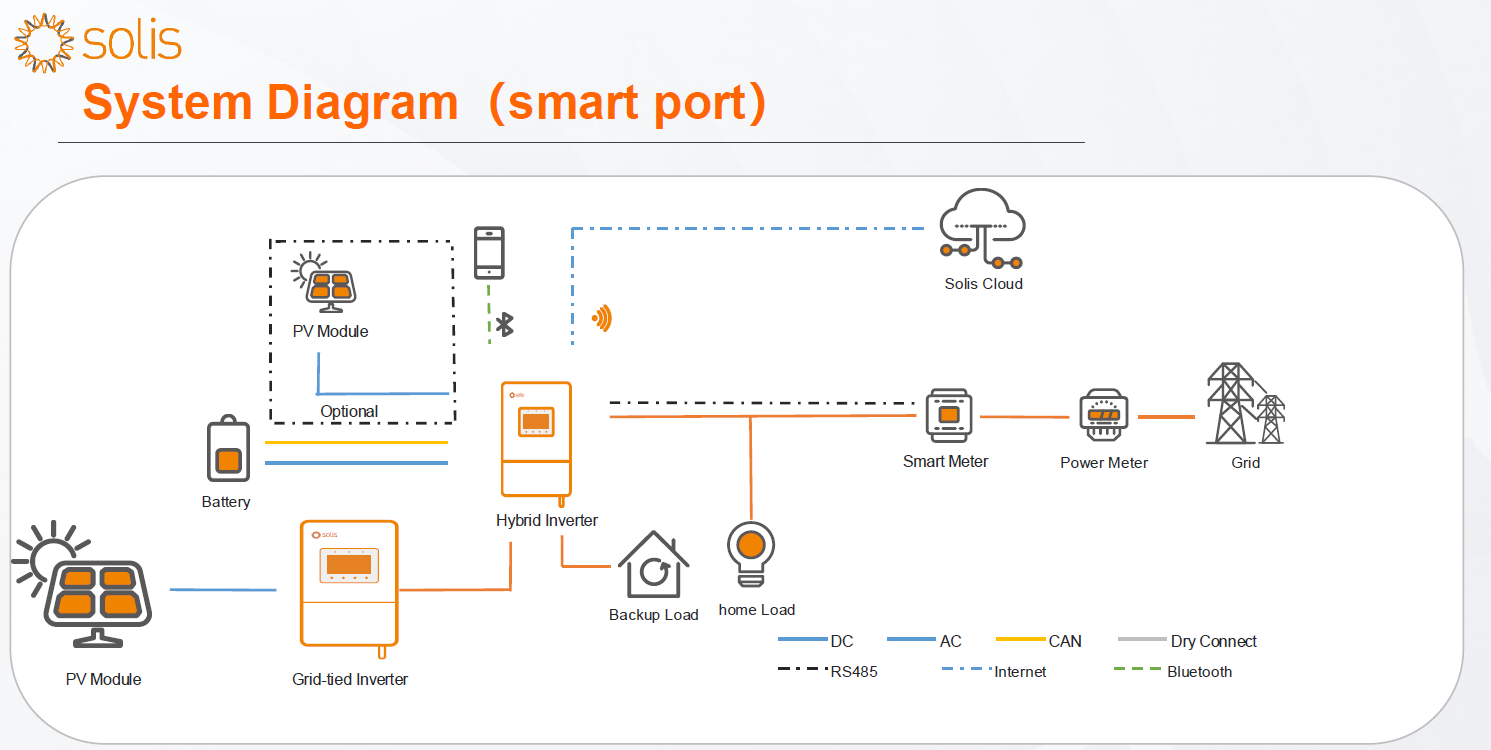 (PV modules → Third‑party/Solis PV inverter → S6 Hybrid Smart Port; Battery; Backup & Home Loads; Meter; SolisCloud)
For Series S6-EH3P(12-20)K-H and S6-EH3P(5-10)K-H
2) AC‑Grid‑Side Coupling with Dual Meters
What it is: The PV inverter connects on the grid side, while the hybrid monitors both the grid and the PV inverter via two smart meters:
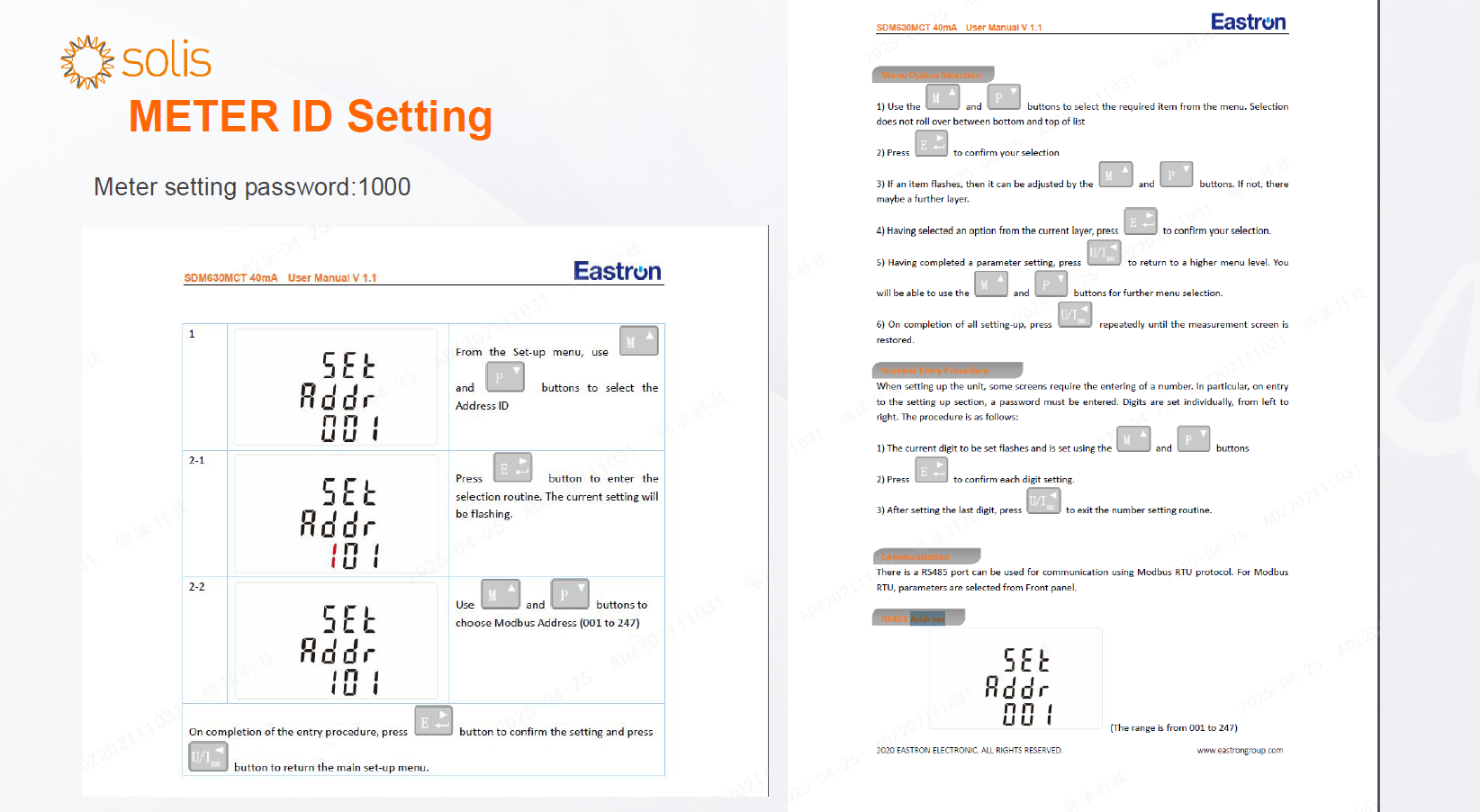
- Smart Meter 1 (Grid, ID: 001, password: 1000)
- Smart Meter 2 (PV inverter, ID: 002, password: 1000)
Key advantages
- The hybrid precisely monitors grid import/export and PV inverter output to optimize battery charge/discharge and export limits.
- Clean separation of concerns: PV generation stays on the grid bus; hybrid manages storage, loads, and export logic with full visibility through meters.
Metering & wiring essentials
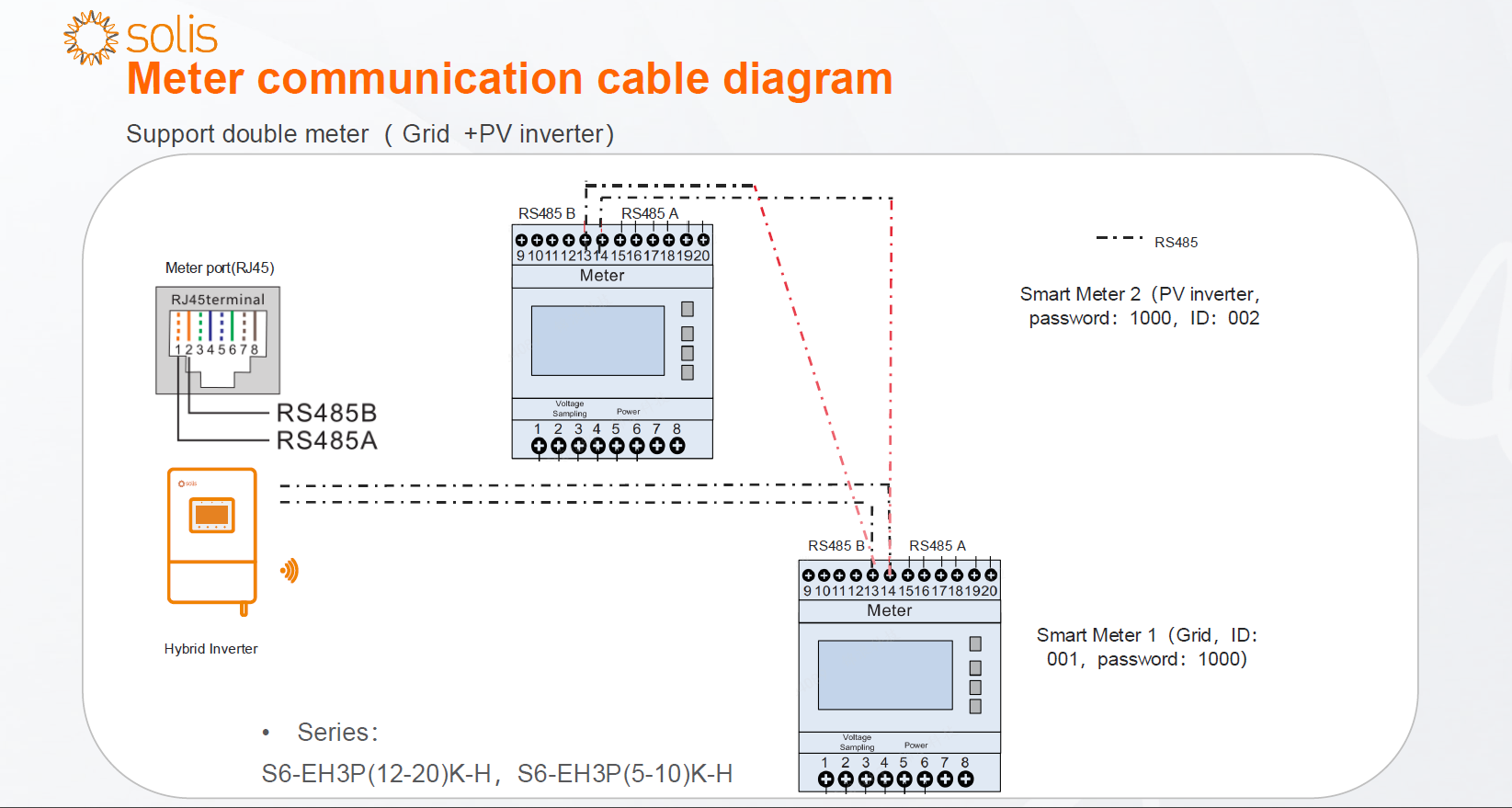
- RS‑485 connections from meters to the S6 meter port (RJ45); set IDs and passwords as above.
- In the inverter UI: Professional Setting → Device Setting → Meter/CT Setting, choose Meter type and Installation Location: Grid + PV Inverter.
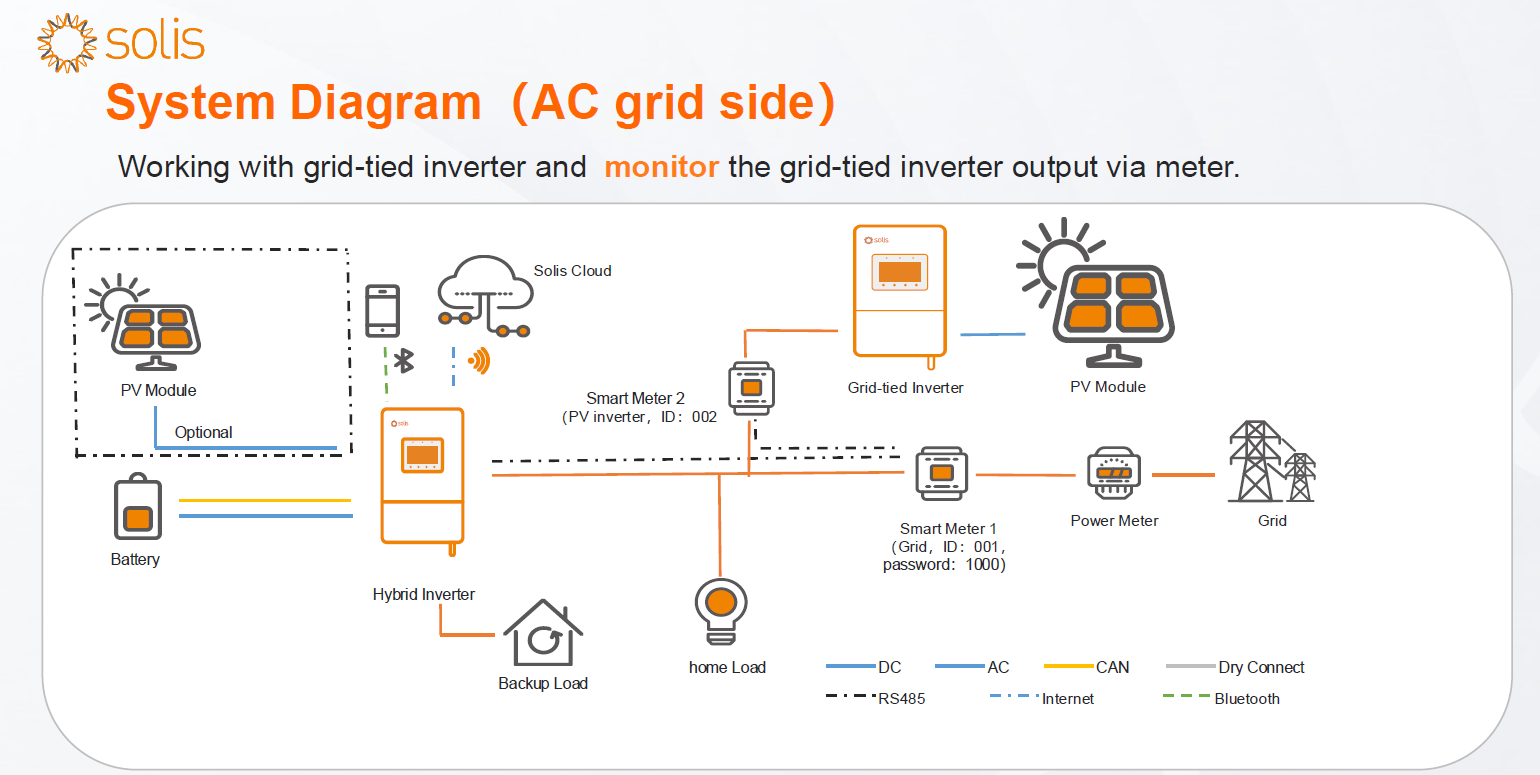 (PV inverter on grid bus; Meter 1 measures grid; Meter 2 measures PV inverter; RS‑485 to S6; Battery; Loads; SolisCloud)
Step‑by‑Step Configuration
A) Smart‑Port AC‑Coupling (with third‑party/Solis PV inverter)
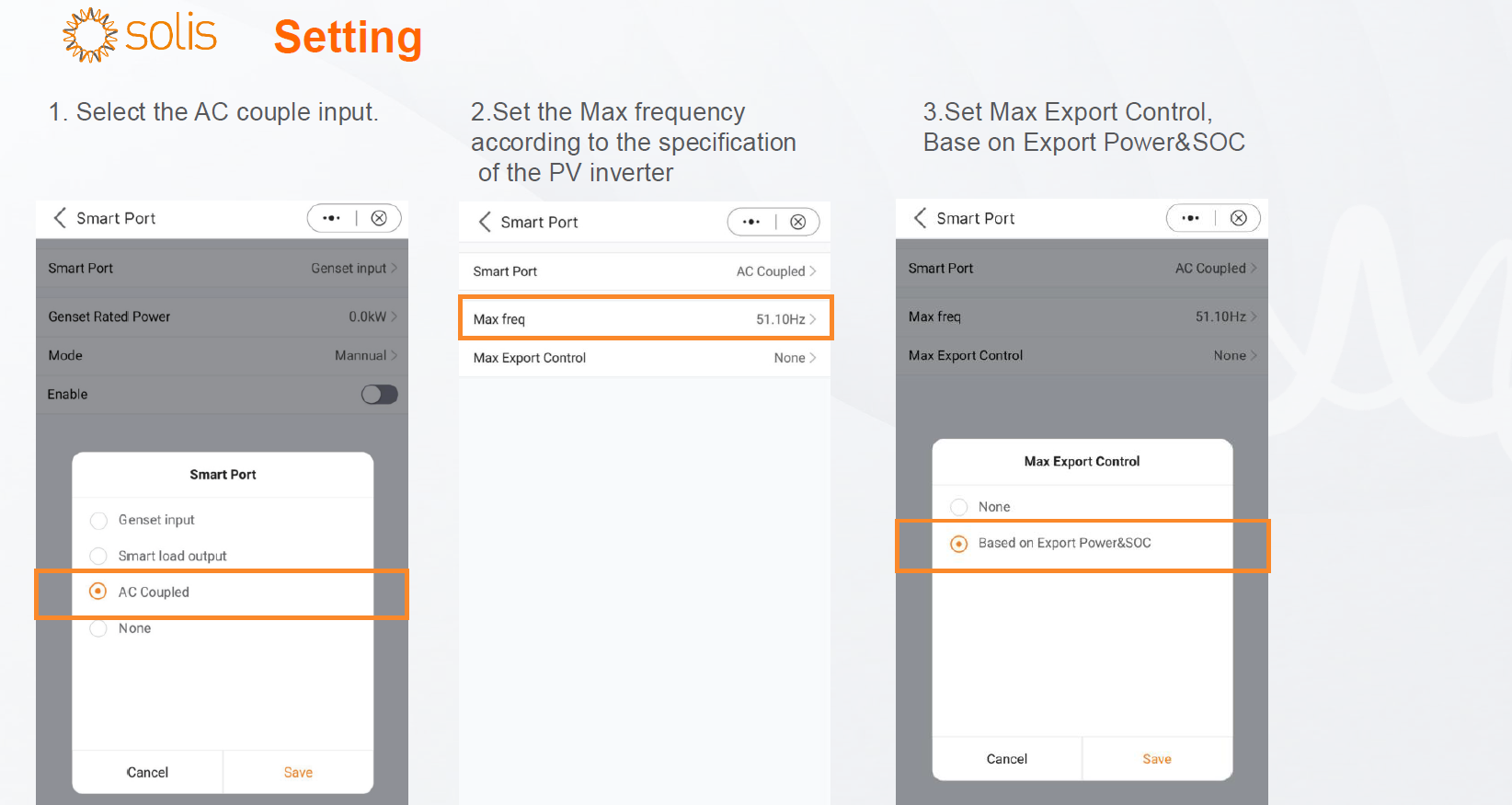
- Select AC‑Couple Input in the S6 hybrid’s settings.
- Set Max Frequency according to the PV inverter’s specification (ensures proper OFLS behavior off‑grid).
- Enable Max Export Control:
- Mode: Based on Export Power & SOC
- Effect: Opens the smart‑port relay if export exceeds the configured limit for the defined duration (factory reference: 100 W for 30 s).
B) AC‑Grid‑Side with Dual Meters
- Wiring:
- Install Smart Meter 1 at the grid point (ID: 001, password: 1000).
- Install Smart Meter 2 on the PV inverter feeder (ID: 002, password: 1000).
- Connect both via RS‑485 A/B to the S6 meter port (RJ45).
- Inverter UI Setup:
- Professional Setting → Device Setting → Meter/CT Setting
- Meter Type: Meter
- Installation Location: Grid + PV Inverter
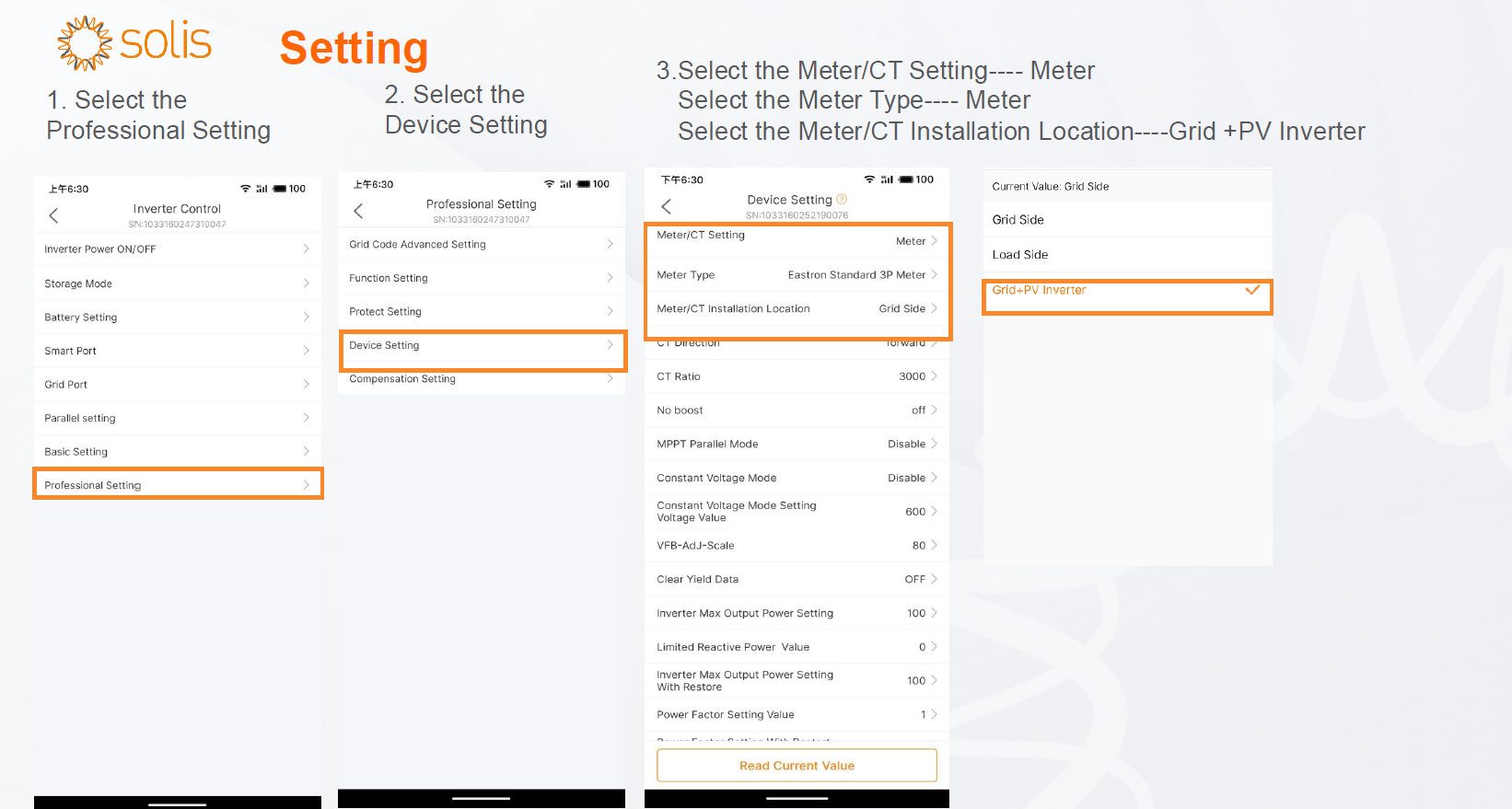
- Verify IDs/Passwords: Use the meter setting password: 1000 to confirm meter IDs (001, 002).
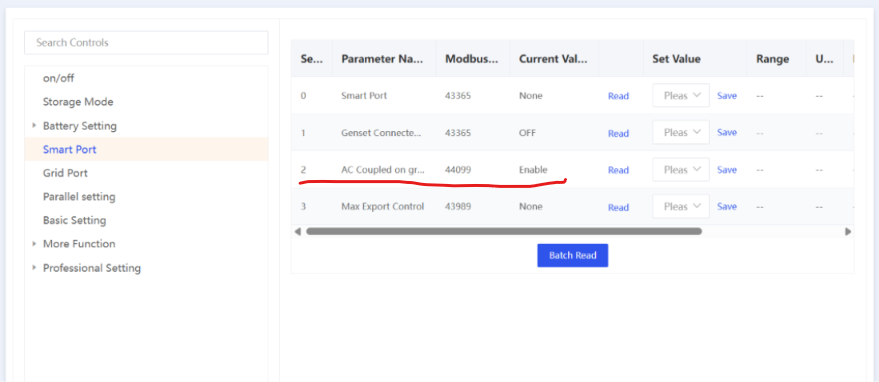
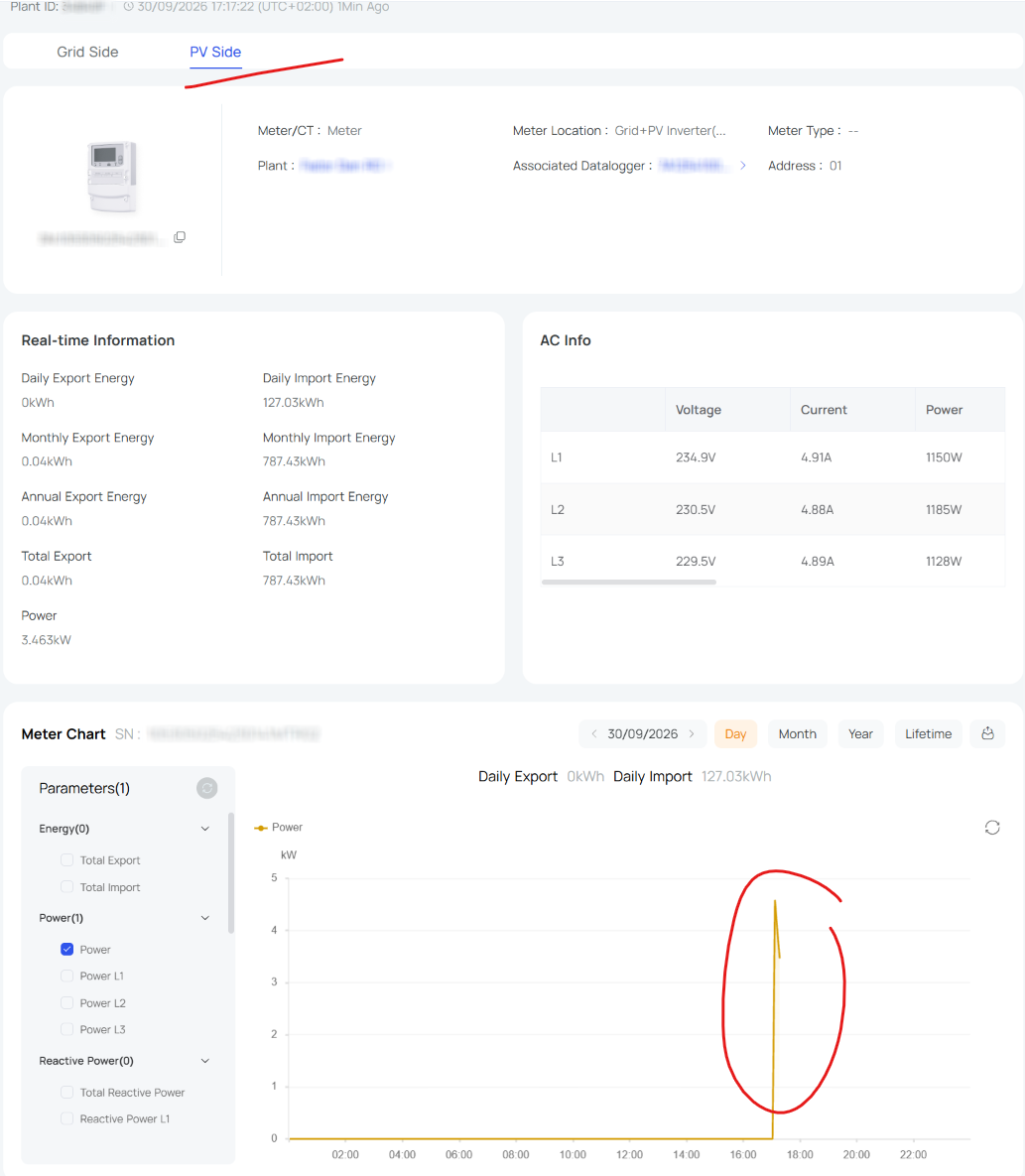
The setting could reset to default value, however, it is important to enable it once. After this meter information will appear under meter section and on the invetrer and overview diagram as well.
Design & Commissioning Best Practices
- Power matching: Ensure the PV inverter AC rating ≤ S6 hybrid rated AC power when using the Smart‑Port. This preserves protection selectivity and relay logic headroom.
- Grid code compliance: For off‑grid operation with a third‑party PV inverter, configure the correct grid code and verify OFLS/UFLR support to allow frequency‑based curtailment.
- Export‑limit strategy: Where zero‑export or strict caps apply, use Max Export Control (Smart‑Port topology) or dual‑meter monitoring (grid‑side topology) to keep exports within utility thresholds.
- Firmware currency: Update the S6 hybrid (and PV inverter, if applicable) to the latest firmware prior to testing export limits or islanding transitions.
- Validation tests:
- On‑grid: Simulate high PV production to confirm export capping and smart‑port relay behavior.
- Off‑grid: With SOC ≥ 85%, verify that frequency rise curtails PV as expected.
Frequently Asked Questions
Q1: Can I AC‑couple any single‑phase PV inverter to the S6 three‑phase hybrid?
A: No. Only three‑phase grid‑tied inverters are supported for AC‑coupling on the Smart‑Port with the S6 three‑phase hybrid.
Q2: How does the S6 limit export when it can’t directly control a third‑party PV inverter?
A: Enable Max Export Control (Based on Export Power & SOC). If the measured export exceeds your set cap for the defined window (ref. 100 W/30 s), the S6 opens the smart‑port relay to halt contribution from the AC‑coupled inverter.
Q3: What ensures safe off‑grid operation with a third‑party PV inverter?
A: The third‑party inverter must support frequency‑watt response (OFLS/UFLR) under its grid code, allowing the S6 to regulate PV output by adjusting system frequency—e.g., curtailing when SOC ≥ 85%.
Q4: Can the S6 monitor PV production from a grid‑side PV inverter?
A: Yes—use dual meters (Grid = ID 001, PV Inverter = ID 002) and configure Meter/CT Installation Location: Grid + PV Inverter for full visibility.
Summary
Whether you connect via the Smart‑Port for direct AC‑coupling or opt for grid‑side coupling with dual meters, the Solis S6 three‑phase hybrid delivers a robust path to add batteries, enforce export limits, and enable backup—without reworking the PV DC side. Follow the topology‑specific setup steps, keep firmware current, and validate export and frequency responses to ensure a compliant, resilient installation.