
Troubleshooting PLCC Communication Issues in S6-GU350K-EHV-M12 Inverters
Overview
In plants using 350K M12 inverters with PLCCO communication, it has been observed that communication may become unstable or drop completely when a particular inverter starts operating. This document outlines the root cause and step-by-step troubleshooting procedure to resolve the issue.
Observed Issue
- PLCC communication is not stable across all inverters
- Communication drops when a specific inverter is turned ON
- Other inverters may also lose communication due to one faulty unit
Root Cause
Improper grounding of the HMI board inside the inverter can create signal distortion in the PLCC communication network.
A single inverter with poor grounding can disturb communication for the entire plant.
Troubleshooting Procedure
Step 1: Ensure Safety
- Turn OFF both AC and DC supply of the inverter
- Confirm complete isolation before opening the inverter
Step 2: Open the Inverter
- Carefully open the inverter front cover
- Locate the HMI board grounding screw
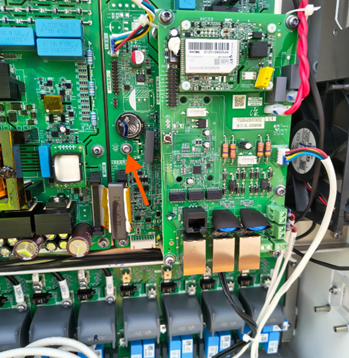
Step 3: Check Ground Continuity
- Using a multimeter, check continuity between:
- HMI board grounding screw and any nearby screw
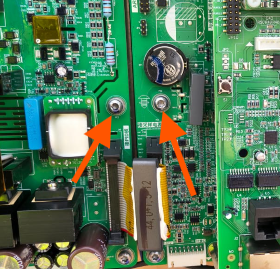
Step 4: Analyze Results
- If continuity is present:
Grounding is proper → Check other causes - If NO continuity:
Indicates improper grounding
Step 5: Corrective Action
- Replace or properly tighten the HMI grounding screw
- Ensure firm metal-to-metal contact
- Recheck continuity after replacement
Important Note
⚠️ Proper grounding of the HMI board is critical.
Even a single inverter with improper grounding can cause communication failure across all inverters in the PLCC network.
Conclusion
Ensuring proper grounding of the HMI board resolves most PLCC communication issues in S6-GU350K-EHV-M12 inverter installations. This should be one of the first checks when facing communication instability.